



To create an AI agent, start with one clear task, give it specific instructions, connect the tools it needs, and test the results. You can create a simple AI agent without coding, or build a more advanced one with Python and an AI API.
- What Is an AI Agent?
- AI Agent vs Chatbot
- How to Create an AI Agent
- 1. Choose One Task
- 2. Write Clear Instructions
- 3. Choose an AI Model
- 4. Add Tools
- 5. Add Knowledge
- 6. Set Permissions
- 7. Test Your Agent
- How to Build an AI Agent Without Coding
- How to Build an AI Agent With Code
- Can You Create Free AI Agents?
- Simple AI Agent Ideas
- Common Mistakes
- Final Thoughts
- FAQs
AI agents sound complicated until you break one down.
Think about a normal chatbot. You ask a question, it gives you an answer, and the conversation ends there. An AI agent can do more. Depending on how it is built, it can read information, use tools, make decisions about the next step, and complete part of a task for you.
For example, instead of asking AI how to prepare a weekly SEO report, you could give an agent access to approved data and ask it to prepare the report itself.
That is the basic idea behind an AI agent.
OpenAI describes agents as systems that can accomplish tasks on a user’s behalf by using an AI model, instructions, and tools.
What Is an AI Agent?
An AI agent is a software system that uses an AI model to work toward a goal and interact with tools or information needed to complete that goal.
AI agents can be useful for everyday tasks too, from organizing information to planning simple routines. If you want to see more practical examples of how AI can fit into daily tasks, check out our guide to AI in Everyday Life.
A simple chatbot might work like this:
Question → Answer
An agent can work more like this:
Goal → Decision → Tool → Result → Next step → Final answer
Imagine you run a website and want a weekly traffic report.
A chatbot can tell you how to create one.
An AI agent could potentially:
- Access approved analytics data.
- Check the numbers.
- Compare them with the previous period.
- Notice major changes.
- Prepare a short report.
- Send the report for human approval.
The exact process depends on the tools and permissions you give it.
This is also why not every AI task needs an agent. Anthropic recommends starting with the simplest setup that can handle the job because agent systems can add cost and complexity.
AI Agent vs Chatbot
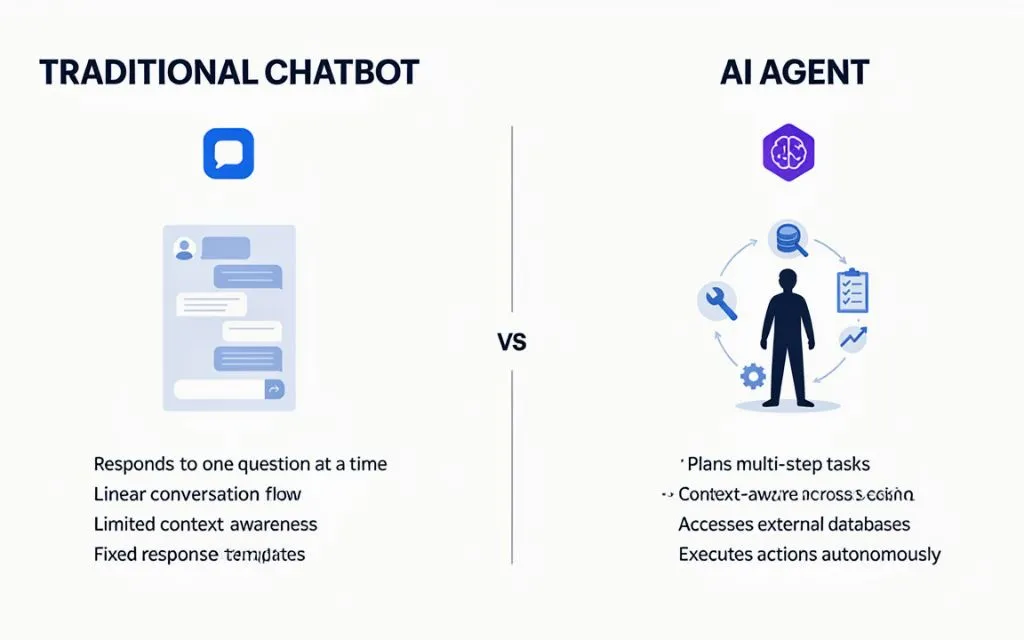
The difference is easier to understand with a simple comparison.
The same idea can be used in business. AI agents can help with lead research, customer questions, email preparation, and sales tasks. For more examples of AI tools used in sales, see our guide to AI SDR Tools.
| Feature | Chatbot | AI Agent |
| Answers questions | Yes | Yes |
| Follows instructions | Yes | Yes |
| Uses external tools | Sometimes | Often |
| Handles several steps | Limited | Yes |
| Takes actions | Limited | Possible |
| Works toward a goal | Usually limited | Yes |
| Needs permissions | Usually low | Often important |
A chatbot is useful when you mainly need conversation or content generation.
An agent becomes useful when the task involves multiple steps, outside information, tools, or actions.
How to Create an AI Agent
You do not need to start with a complicated system.
For your first project, think about a small task you already repeat.
Maybe you regularly:
- Summarize reports
- Organize emails
- Prepare content briefs
- Check website data
- Answer common customer questions
- Sort documents
- Create weekly summaries
Pick one.
Once the task is clear, the actual process becomes much easier.
1. Choose One Task
This is probably the most important part.
Do not tell your new agent:
“Help me with my business.”
That is too broad.
Instead, give it a job such as:
“Read my weekly website report and prepare a short summary of traffic changes.”
Now you have something that can be tested.
You can also give the agent a success condition.
For example:
The report should include total traffic, the five highest-traffic pages, major changes from last week, and three areas that need attention.
That is much easier to check than a vague request.
Start small. You can always add more capabilities later.
2. Write Clear Instructions
Once you know the task, tell the agent exactly how it should behave.
For example:
Role: You are a website analytics assistant.
Task: Prepare a weekly website performance report.
Style: Clear and concise.
Data: Use only the information provided by the connected tools.
Rule: Never invent missing statistics.
Output: Give a short summary followed by a table.
Notice that this is not a huge prompt.
It simply tells the agent what it is supposed to do, what information it can use, and what the final response should look like.
OpenAI’s guidance also recommends clear instructions, defined actions, and instructions for handling situations where information is missing.
3. Choose an AI Model
The model is the part that handles the language and reasoning.
There are many models available, and you do not necessarily need the most expensive or most capable option.
A simple task such as sorting support messages may need less capability than a coding agent that works across multiple files.
When choosing a model, consider:
- Accuracy
- Cost
- Speed
- Context size
- Tool support
- Your actual task
One practical approach is to test your agent with a capable model first. Once you know the quality you need, you can test less expensive models for simpler parts of the workflow. OpenAI recommends this type of performance and cost comparison.
4. Add Tools
This is where an AI agent starts becoming much more useful.
Tools allow the agent to interact with systems outside the AI model.
Depending on the project, tools could include:
- Web search
- APIs
- Databases
- Spreadsheets
- File search
- Calculators
- CRM software
- Calendar systems
For example, a customer support agent might have access to a product database and a support knowledge base.
It could then check the relevant information before answering a customer.
OpenAI groups agent tools into data tools, action tools, and orchestration tools.
The important part is not giving an agent 20 tools just because they are available.
Give it the tools it actually needs.
Too many similar tools can make tool selection harder and increase the number of things that need testing.
5. Add Knowledge
Your AI agent may need information that is specific to your business.
For example, a customer support agent could need:
- Product information
- Shipping policies
- Return rules
- Pricing
- FAQs
- Internal documents
You can provide this information through files, databases, APIs, or retrieval systems.
This is especially useful because company information can change.
Suppose your return policy changes from 30 days to 60 days. You want the agent to use the current policy rather than rely on information buried in an old prompt.
Anthropic describes tools, retrieval, and memory as common ways to give AI systems additional context.
6. Set Permissions
This part is easy to overlook.
If an agent can only answer questions, the risk is relatively limited.
But what happens when it can send emails, update customer records, publish content, or make purchases?
You need rules.
For example, an email agent could be allowed to:
- Read emails
- Summarize conversations
- Prepare replies
But sending the actual email could require human approval.
A simple workflow could be:
Agent prepares action → Human checks it → Action is approved
This is particularly useful for sensitive tasks.
You should also think about what happens when an agent reads information from outside sources. External text can contain instructions that were never meant for your agent. Security researchers and standards organizations continue to study risks such as prompt injection and agent hijacking.
For a first project, keep permissions narrow and give the agent only the access it needs.
7. Test Your Agent
Do not judge your agent from one good response.
Give it several different situations.
| Test | What to check |
| Normal request | Does it complete the task? |
| Missing information | Does it ask for the missing data? |
| Wrong information | Does it avoid making assumptions? |
| Unexpected request | Does it stay within its role? |
| Tool failure | Does it handle the error? |
| Sensitive action | Does it ask for approval? |
Keep some real examples and run them through the agent repeatedly.
Anthropic recommends structured evaluations for agent systems because errors can happen across several steps, not just in the final response.
How to Build an AI Agent Without Coding
You do not have to be a programmer to create AI agents.
Many AI agent builders provide visual interfaces where you can configure things such as:
- Instructions
- Knowledge
- Tools
- Workflows
- Permissions
- Output formats
The basic process is usually something like:
Create agent → Add instructions → Add knowledge → Connect tools → Test → Use
This can be a good starting point for someone who wants to automate a small business or personal task without building a complete application.
If the task later becomes more complicated, you can move toward an API or software development approach.
How to Build an AI Agent With Code
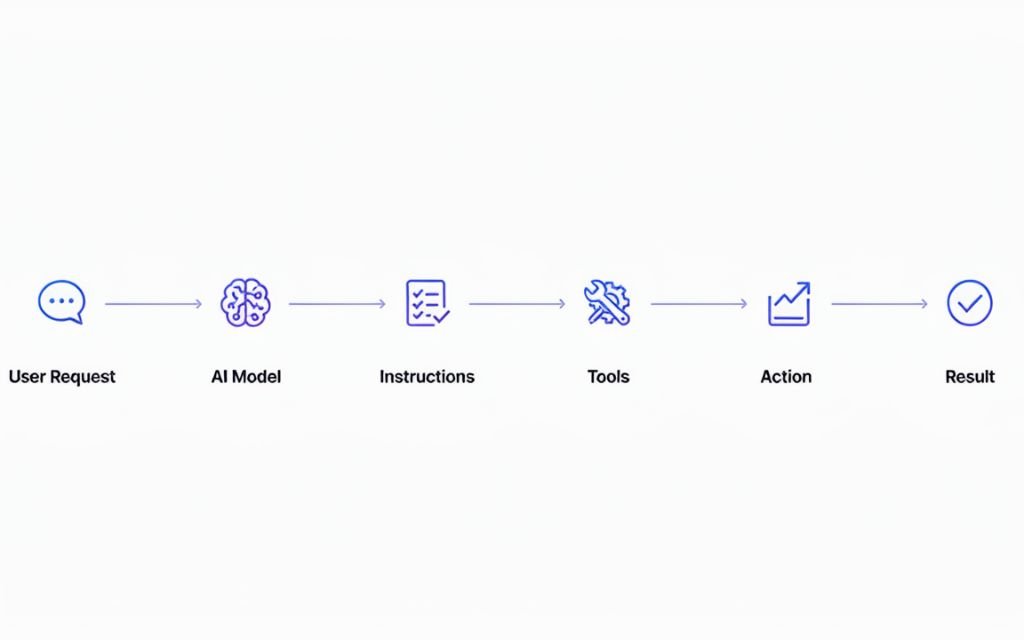
Developers have more control because they can connect an agent directly to APIs, databases, websites, and other software.
A simple structure looks like this:
User
↓
AI Agent
↓
Instructions
↓
Tool
↓
Tool Result
↓
Final Response
For example, a Python-based agent could receive a question, call a search or database tool, process the result, and then return a response.
OpenAI’s Agents SDK provides building blocks for agents, tools, handoffs, guardrails, and tracing.
You do not need a multi-agent system for your first project.
A single agent with a few well-defined tools can handle plenty of useful tasks.
Can You Create Free AI Agents?
Yes. You can create free AI agents, although free usually comes with limits.
Depending on the platform, you may have restrictions on:
- Number of requests
- Model usage
- Storage
- Tool calls
- API usage
Another option is running an open-source model locally, although that can require a suitable computer and some technical setup.
For a beginner, a small experiment is enough.
You could start with one task, a free or low-cost platform, a small set of documents, and one tool.
If the agent proves useful, you can decide whether paying for additional usage makes sense.
Simple AI Agent Ideas
Here are a few projects that are realistic for beginners.
Content Research Agent
Give it a topic and approved sources, then ask it to organize research notes.
Customer Support Agent
Connect it to your FAQs and product information so it can answer common questions.
SEO Reporting Agent
Give it access to approved website data and have it prepare a weekly report.
Content Brief Agent
Give it a topic and ask for a content outline, questions to answer, and internal linking suggestions.
Personal Productivity Agent
Use an agent to summarize documents, organize notes, or prepare routine task lists.
The best first project is usually something you already do repeatedly.
Common Mistakes
Trying to Build Everything at Once
Your first agent does not need to run an entire company.
Give it one job.
Using Vague Instructions
“Help with SEO” is not enough.
Tell the agent what information to use and what output you expect.
Giving Too Many Tools
Only connect tools that are relevant to the task.
Skipping Testing
A good response once does not prove reliability.
Test normal requests and unusual situations.
Giving Too Much Access
Use the smallest set of permissions required.
Trusting Every AI Response
AI can make mistakes. Important information and actions should have appropriate checks.
Final Thoughts
You do not need to be an expert programmer to create your first AI agent.
Start with a small task that you already understand. Give the agent clear instructions, connect the information and tools it needs, keep its permissions limited, and test it with real examples.
If the first version works, add another capability.
That is a much easier way to build AI agents than trying to create a huge autonomous system from day one.
And if you want to experiment without coding, an AI agent builder may be enough for your first project.
The main question is simple:
What repetitive task would you like an AI system to handle for you?
Start there.
FAQs
How do I create an AI agent?
Choose one task, write clear instructions, select an AI model, connect the required tools and information, set permissions, and test the agent with different examples.
Can I create an AI agent without coding?
Yes. No-code and low-code AI agent builders can let you create AI agents using instructions, tools, documents, and visual workflows.
Can I build an AI agent for free?
Yes. Some platforms have free plans or limited usage, while open-source models can also be run locally. Costs may apply when you use paid APIs, hosting, storage, or external services.
What is an AI agent builder?
An AI agent builder is a platform that helps you configure an AI agent without having to build every component manually. Features can include instructions, tools, knowledge sources, workflows, and testing.
What is the difference between an AI agent and a chatbot?
A chatbot mainly responds to conversations. An AI agent can work toward a goal, use external tools, process information, and potentially take actions within defined permissions.
Do AI agents need human approval?
Not always. Low-risk tasks may require little oversight, while actions involving money, sensitive information, account changes, or external communication may need human approval.